Lab 1 : Aligned AXI Data on SIMD#
Introduction#
In this lab, you will focus on AXI single transaction and SIMD MAC operands. Then, we use these custom instruction in convolution operation to reduce runtime of model inference. We use ds_cnn_stream_fe model to compare convolution between our accelerated version and orignal software-only version.
Goal of this lab#
Know function about AXI I/O and control them to achieve AXI single transaction.
Use custom SIMD MAC to acclerated convolution.
Understand cache block operaction to maintain cache coherence.
Understand how to handle misaligned address condition in AXI single transaction.
Run full TFLM model in platform: know how to add model into this platform.
Background#
AXI Protocol Basics#
The AXI protocol is a high-performance, high-bandwidth memory-mapped bus interface used in this platform. The NPU acts as an AXI4 master to directly access DRAM without CPU intervention.
Key signals and handshake rules you will encounter in NPU.v
Channels: Read Address (AR), Read Data (R), Write Address (AW), Write Data (W), and Write Response (B).
Handshake: Each channel uses a two-way VALID / READY mechanism. A transfer occurs only when both VALID and READY are asserted in the same clock cycle. Refer to the handshake wave diagram(AXI burst read/write provided) below for better understanding of the handshake process.
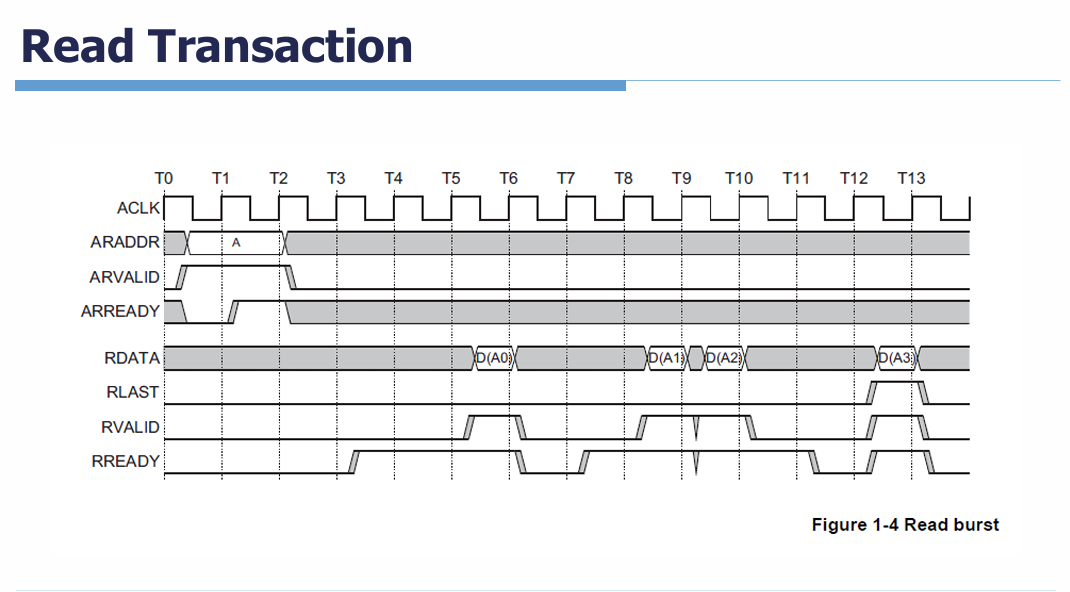
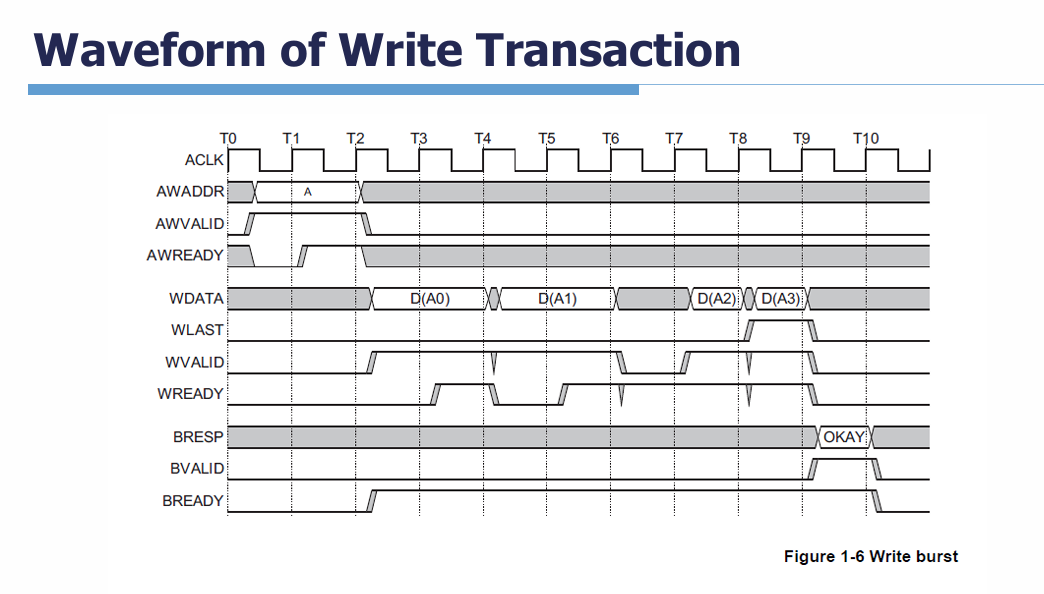
Single Transaction: In lab 1, we focus on single-beat (non-burst) 4-byte read/write transfers. You must drive the address channel, wait for the data channel, and properly handle the handshake signals to complete one transaction.
You can also refer to the supplementary slides from lab 0 for more details about AXI.
Address Alignment and Misaligned Access#
Since we are dealing with 8-bit data elements, memory addresses are not always 4-byte aligned. You must design your NPU.v in the way that can handle both aligned and misaligned access.
Aligned Address: A 4-byte transfer is aligned when address[1:0] == 2’b00. In this case, a single AXI read/write cycle fetches the exact 4 bytes.
Misaligned Address: When address[1:0] != 2’b00, issuing a single 4-byte AXI request to an misaligned address may cause an AXI exception.
For more information on how to handle aligned and misaligned accesses, read the Adavance Exercise 1 - AXI Address Aligned section.
Grading#
Component |
Weight |
|---|---|
AXI Single Transatction |
60% |
AXI Address Aligned |
15% |
Running Full TFLM Model |
10% |
Demo and questions |
15% |
Prerequisites and setup#
Vivado 2024.1
RISC-V toolchain
Python 3 with
pyserial
Add ds_cnn_stream_fe into platform#
We use a Keyword Spotting (KWS) model for this lab. The model was originally trained as a floating-point model and then quantized to INT8. Since model quantization is not the focus of this lab, we have provided the pre-quantized INT8 model for you. You can directly use the provided quantized model on our platform without performing the quantization process yourself.
Note
You can download .tflite file and input data from below links.
Add .tflite, profile.cc, input data folder into
Platform/sw/models/.Register TFLM OP in
tflm_ops.cc, and modifykTflmResolverOpCountintflm_ops.hwith number of register OP.Set parameter in
project.mkfile (MODEL_FILE,MODEL_PROFILE,TENSOR_ARENA_SIZE), and add file of input data intoAPP_EXTRA_SRCS.
Hint
You can refer to the website in reference section to determine which TFLM OP will be used in model. Note that you only need to register each operator exactly once. For instance, if the model has many layers of conv2d, only register conv2d once.
You can set
TENSOR_ARENA_SIZEas 1MB. Tensor arena size will depend on model, and you can try to different size to get minimal value.
After adding the model files, please do the following:
Download everything in
lab1/from AAML2026-Lab.Replace existing files or add new files to
Platform/sw/project/using the downloaded version.Add
APP_EXTRA_SRCS += $(wildcard models/label/label*_board.cc)toproject.mk, or define it when runningmake.From the repository root, run the following preflight check before editing the RTL:
vivado -version
verilator --version
c++ --version
riscv64-unknown-elf-g++ --version
python3 -c "import serial"
make -C Platform/sw validate
make -C Platform/sw check-env \
  MODEL_FILE=ds_cnn_stream_fe.tflite MODEL_PROFILE=ds_cnn_stream_fe
Use the course setup instructions if one of these commands fails.
Files and submission boundary#
You may modify:
Platform/sw/tflm_patches/tensorflow/lite/kernels/internal/reference/integer_ops/conv.hPlatform/hw/srcs/NPU.vtflm_ops.h,tflm_ops.cc,tflm_runners.cc
You can add .v file in Platform/hw/srcs for submodule in your NPU.
Basic Exercise - AXI Single Transaction & SIMD - 60%#
1. AXI Single Transaction#
In this part, the goal is to enable the NPU to access data directly through the AXI4 interface instead of relying on the CPU’s LSU (Load/Store Unit).
The AXI4 master interface of the NPU is provided in Platform/hw/srcs/NPU.v. The NPU must control this interface to issue AXI4 read requests, receive the requested data from memory, and return the data through the CPU interface.
The implementation should handle the AXI4 read transaction correctly, including address and data handshaking. The returned data should then be provided to the CPU through the NPU’s existing CPU-side interface, allowing the NPU to directly fetch operands from memory without requiring the CPU’s LSU to perform the load operation.
Important
Please follow below table to design NPU AXI read/write instruction.
Funct3 |
Funct7 |
Software Function |
Description |
|---|---|---|---|
|
|
|
Issue a 4-byte AXI4 read request and return the received data |
|
|
|
Issue a 4-byte AXI4 write request with the provided data |
TODO:
Control AXI interface in
NPUto make it can finish a single DRAM transation when it receive correspondingfunct3.Return value from
NPU_outto CPU if receiving reading request.
Note
If you want more information about custom instruction of software, you can trace these files, “accel_ops.h”, “accel_ops.cc”, and “accel_test.cc”.
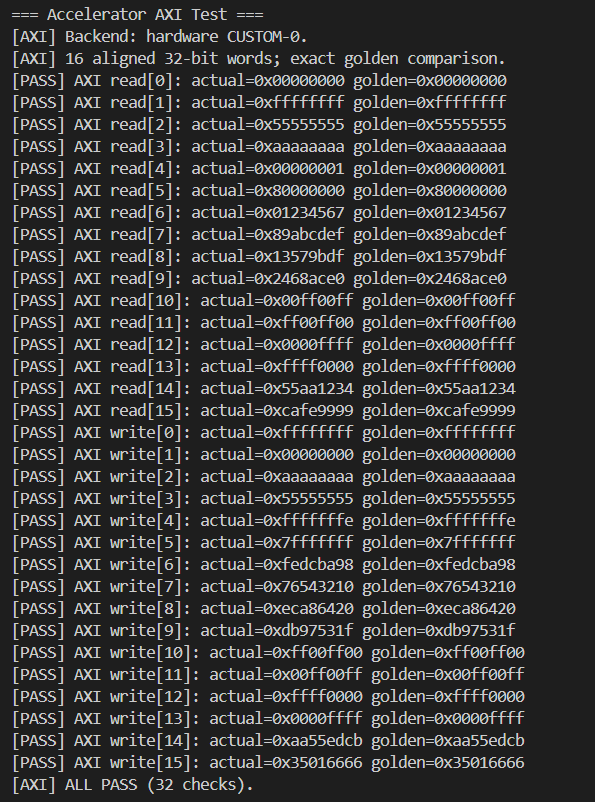
Verification:
Run “Accelerator AXI Aligned Test” in lab1 menu.
If result show “AXI read” and “AXI write” pass, this part is correct.
2. SIMD MAC#
The main principle of SIMD (Single Instruction, Multiple Data) instructions involves processing multiple data with a single instruction. In the int8 convolution, each filter and input value spans 8 bits. Utilizing a custom CFU operation, we can employ two 32-bit wide registers. This setup enables the execution of four simultaneous MAC (Multiply-Accumulate) operations in a single cycle.
              7 bits
         +--------------+
funct7 = | (bool) reset |
         +--------------+

              int8_t           int8_t           int8_t           int8_t
         +----------------+----------------+----------------+----------------+
   in0 = | input_data[0]  | input_data[1]  | input_data[2]  | input_data[3]  |
         +----------------+----------------+----------------+----------------+

              int8_t           int8_t           int8_t           int8_t
         +----------------+----------------+----------------+----------------+
   in1 = | filter_data[0] | filter_data[1] | filter_data[2] | filter_data[3] |
         +----------------+----------------+----------------+----------------+

                                        int32_t
         +----------------------------------------------------------------------+
output = | output + (input_data[0, 1, 2, 3] + offset) * filter_data[0, 1, 2, 3] |
         +----------------------------------------------------------------------+
Note
You may choose any
funct3andfunct7values to define your own MAC instruction, except for thefunct3reserved for the AXI read and write instructions.You can also define your instruction to accelerated convolution function in next step.
Hint
This part does not have any test. You can write your test function and add it into menu to test correction of SIMD instruction.
TODO: Make
NPUcan run custom SIMD instruction if it receive specificfunct3andfunct7, and return output value byNPU_outto CPU.
3. conv.h#
In this part, you need to modify conv.h and change ConvPerChannel function into accelerated version. Please use AXI read function of NPU to get input data and filter, and use your MAC instruction in previous part.
Note
You can find ConvPerChannel function in Platform\sw\tflm_patches\tensorflow\lite\kernels\internal\reference\integer_ops\conv.h
Replace some parts of original operations with cfu_op, and don’t forget to add #include "cfu.h" and #include "cbo.h" in the file.
for (int out_channel = 0; out_channel < output_depth; ++out_channel) {

    ...

    int32_t acc =

    for (int filter_y = 0; filter_y < filter_height; ++filter_y) {
        const int in_y = in_y_origin + dilation_height_factor * filter_y;
        for (int filter_x = 0; filter_x < filter_width; ++filter_x) {
            const int in_x = in_x_origin + dilation_width_factor * filter_x;

            // Zero padding by omitting the areas outside the image.
            const bool is_point_inside_image =
                (in_x >= 0) && (in_x < input_width) && (in_y >= 0) &&
                (in_y < input_height);

            if (!is_point_inside_image) {
                continue;
            }

            for ( ) {

            }
        }
    }

    ...
}
Important
You only allow to get input and filter data by NPU AXI read instruction (cfu_op1) which you finsih in first step.
Hint
Because of directly accessing memory without D-cache, you needs to consider about cache coherence problem. Our platform supports two D-cache operation, cbo_clean and cbo_invalidate. You can use software function in cbo.h to control D-cache.
TODO:
Use the AXI read function to get data and filter values.
Maintain cache coherence using
CBOinstructions to ensure AXI reads the latest data.Replace the software computation in
ConvPerChannelwith SIMD instructions to reduce reference execution time.
4. Check Result Correction#
You can run “Basic Convolution Test” in project menu. This test only has address aligned condition.
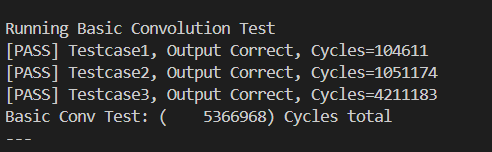
If you pass all testcase, you can get full score of basic part.
Adavance Exercise 1 - AXI Address Aligned - 15%#
Because of 8-bit element type of model, some AXI reading request may use misaligned address data, and misaligned address may cause AXI trigger exception. Therefore, we need to make our NPU to handle request with misaligned address data.
Hint
We can divide single DRAM request into two DRAM request, and combine two request into one 4 byte data transition.
For example, NPU want to read 4 bytes data in 0x6000_0002. It needs to read 0x6000_0000 and 0x6000_0004 data. Then, combine higher two byte of first read and lower two byte of second read.
TODO:
Add address alignment control to the AXI single transaction.
Ensure
NPUcan get correct result if it receive request with misaligned address.
Verfication:
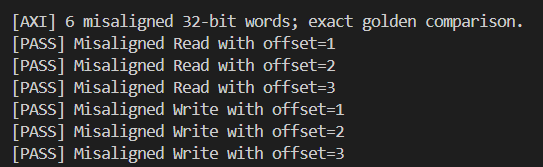
Run “Accelerator AXI Misaligned Test” in lab1 menu.
If you pass “Misaligned AXI Read” and “Misaligned AXI Write”, your implementation is correct.
Adavance Exercise 2 - Running TFLM Model Inference - 10%#
In this part, We use ds_cnn_stream_fe as our benchmark model. Then, compare runtime cycles to show performance improve on accelerated version convolution.
TODO:
Add below code to show outupt data after inference complete.
Select “TFLM Inference, Verification, and Cycles” in main menu.
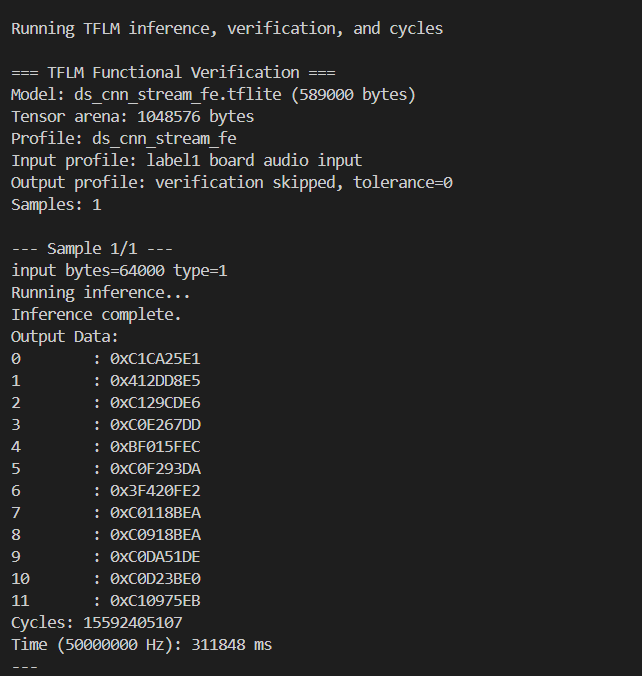
Compare result between orignal version and accelerated version. If your result is match with original version, your implementation is correct.
// Platform/sw/app/tflm_runner.cc
/*...*/

printf("Inference complete.\n");

// show value of output data.
printf("Output Data:\n");
uint32_t* out_raw_bits = (uint32_t*)output->data.f;
for (int i = 0; i < 12; i++) {
    printf("%-9d: 0x%08X\n", i, out_raw_bits[i]);
}
//

/*...*/
Important
If your result is match and runtime cycles is less than original version convolution, you can get score in this part.
This is the result of label1 output using the baseline software only convolution:
This is the result of label1 output after adding simd + AXI:
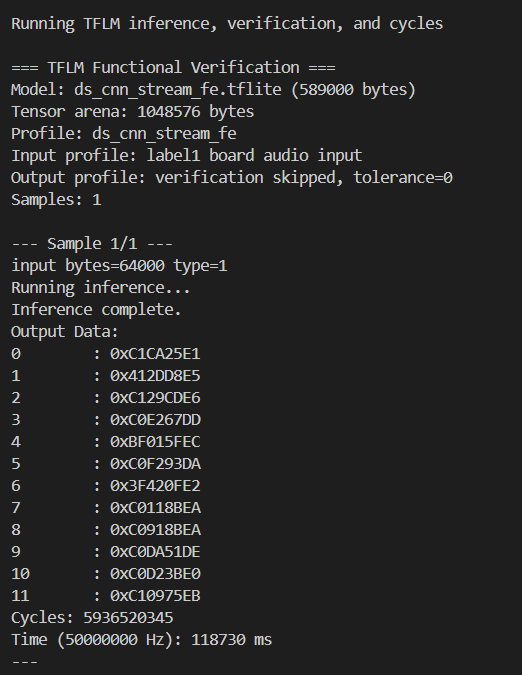
You can also compare two version output of others input in labels to verify correction.
Question in Demo - 15%#
You will be asked several questions about the concepts covered in this lab and your NPU design. You do not need to run your code during the demo.
Lab Report#
Please submit a lab report in the following format for each of the exercise you did.
Format:
Exercise Name
Screenshot of your output
A brief explanation of your design and implementation(5 sentences max).
Submission#
[YourID]-lab1.zip
└── [YourID]-lab1/
    ├── hw/
    │   ├── NPU.v
    │   └── {any other modules}
    ├── sw/
    │   └── conv.h
    └── report/
        └── lab1_report.pdf
Important
Submit source with above files structure. TAs should be able to run your project without any modification. If TAs cannot compile or run your code, you can’t get any scores even if you passed the DEMO. Also, PLAGIARISM is not allowed.
Reference#
Netron : You can visualize the layer graph of .tflite file by this website.